
#
12-10 Hydraulic Fluid Filter Replacement
- Filter
- Transmission fluid (Lion part number: 14700016)
- Lint free cloth
- Plier
- Recovery container
Procedure

Make sure the oil use is an approved oil. A mixture of unapproved oil can cause premature deterioration of seals, which can lead to leaks. Leaking fluid can cause loss of steering assistance, possibly resulting in personal injury and property damage.
- Make sure the work can be done safely.
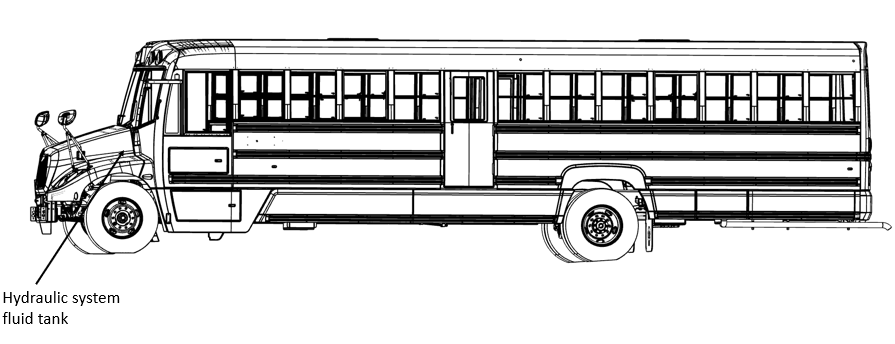
- Locate the power steering fluid tank and clean its lid before removing it (figure 2).
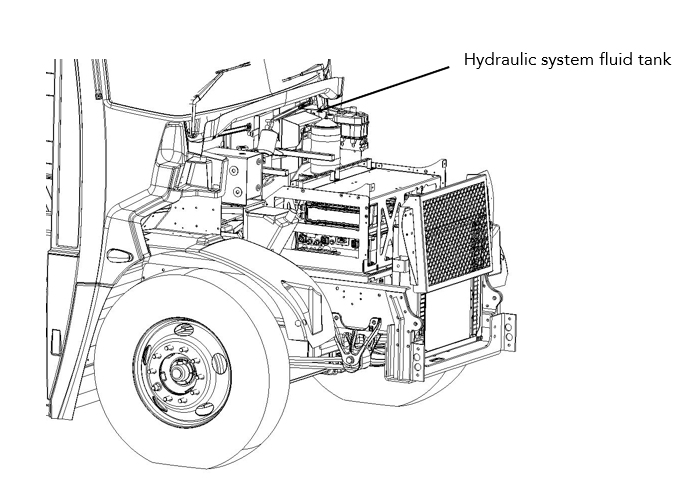
- Locate the overpressure line on the pump.
- Disconnect the line by pinching the retaining collar with pliers and gently pulling on the line.
Make sure that the liquid escaping from the tank and the pump is collected in a container.
- Place the disconnected line in the recovery container.
- Make sure the tank is completely empty.
- Raise the front of the vehicle with a jack and support it with Jack stands.
- Ask someone to turn the steering wheel as far back and forth as possible to collect the residual liquid.
- Add hydraulic oil in the tank.
- Keep turning the steering wheel until the oil flowing in the hose is clean.
- Reconnect the line to the pump.
- Remove the filter from the power steering fluid tank.
- Clean the inside of the tank with a lint-free cloth.
- Inspect the tank for crack or other sign of damage. Replace the tank if necessary.
- Install the new filter in the power steering fluid tank.
- Remove the jack stand and lower the vehicle.
- Fill the tank with new TES 668 hydraulic fluid.
- Start the vehicle and turn the steering wheel as far as possible in both directions.
- Check the fluid level in the tank. Add more oil if necessary.
- Make sure there is no leakage of power steering fluid in the lines, in the tank or on the pump.
- Close the power steering fluid tank lid.